Login | Register


All times are UTC - 5 hours [ DST ]


It is currently Sat May 25, 2013 4:57 pm


Post new topic Reply to topic  [ 17 posts ]  Go to page 1, 2  Next
Author Message
 Post subject: Eschalon Book 3 conceptual UI (with images!)
PostPosted: Thu Apr 29, 2010 2:54 am 
Initiate

Joined: Tue Jun 10, 2008 4:56 pm
Posts: 8
I really enjoy the UI in Eschalon Book 1 and see a lot of improvements in Book 2. I thought it would be super fun to create a UI concept for Eschalon Book 3.

I used the following screenshot as a foundation to build upon.
http://basiliskgames.com/wp-content/gal ... creen7.jpg

I was going to increase the screenshot's size to 1280 x 1024 but didn't like the blurriness and pixelation, so I spent time redoing the screenshot to look good at 1280 x 1024.

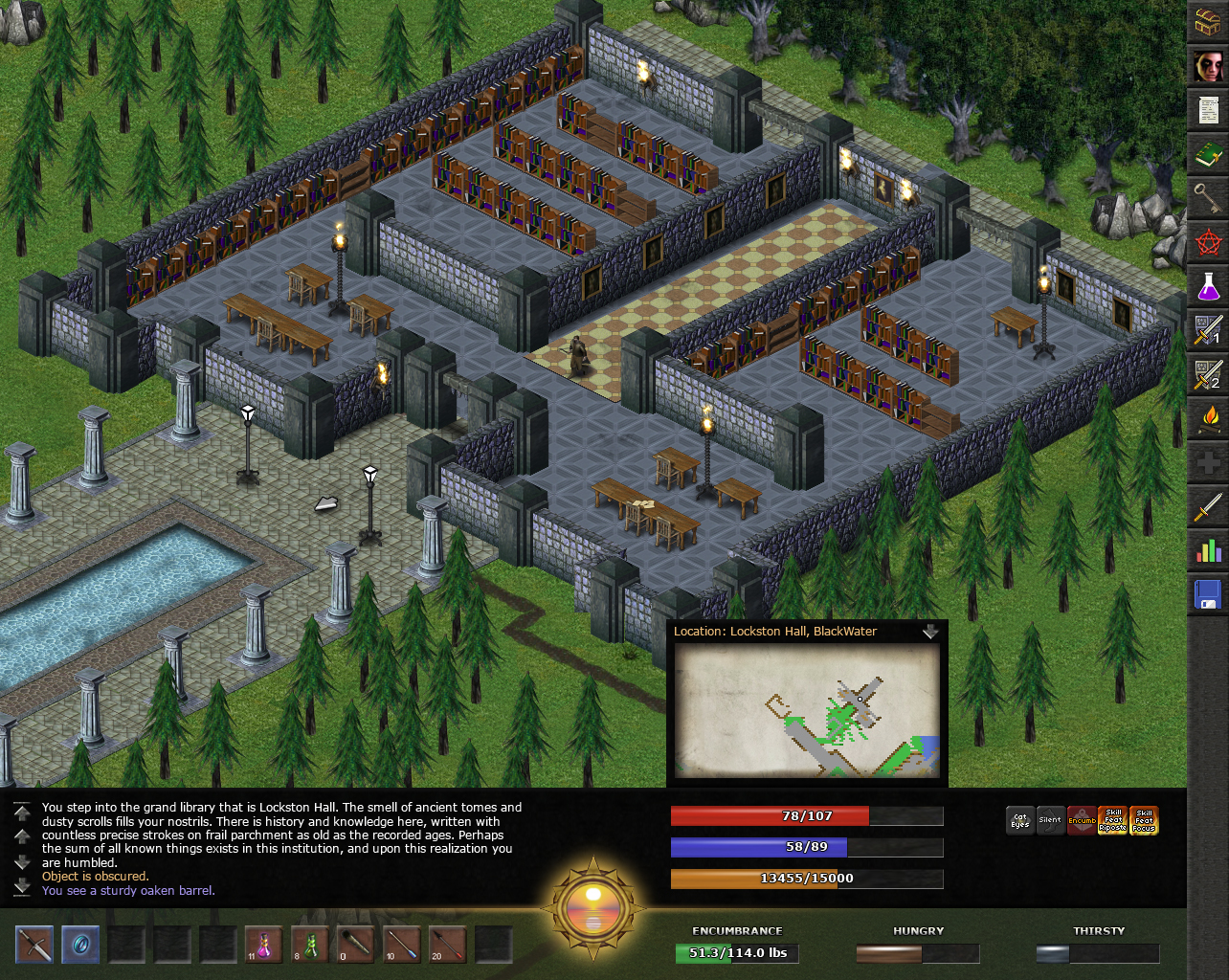
Here's my 1280 x 1024 UI idea with a closed map...
http://www.kxmode.com/eschalon/Eschalon ... ed-map.jpg

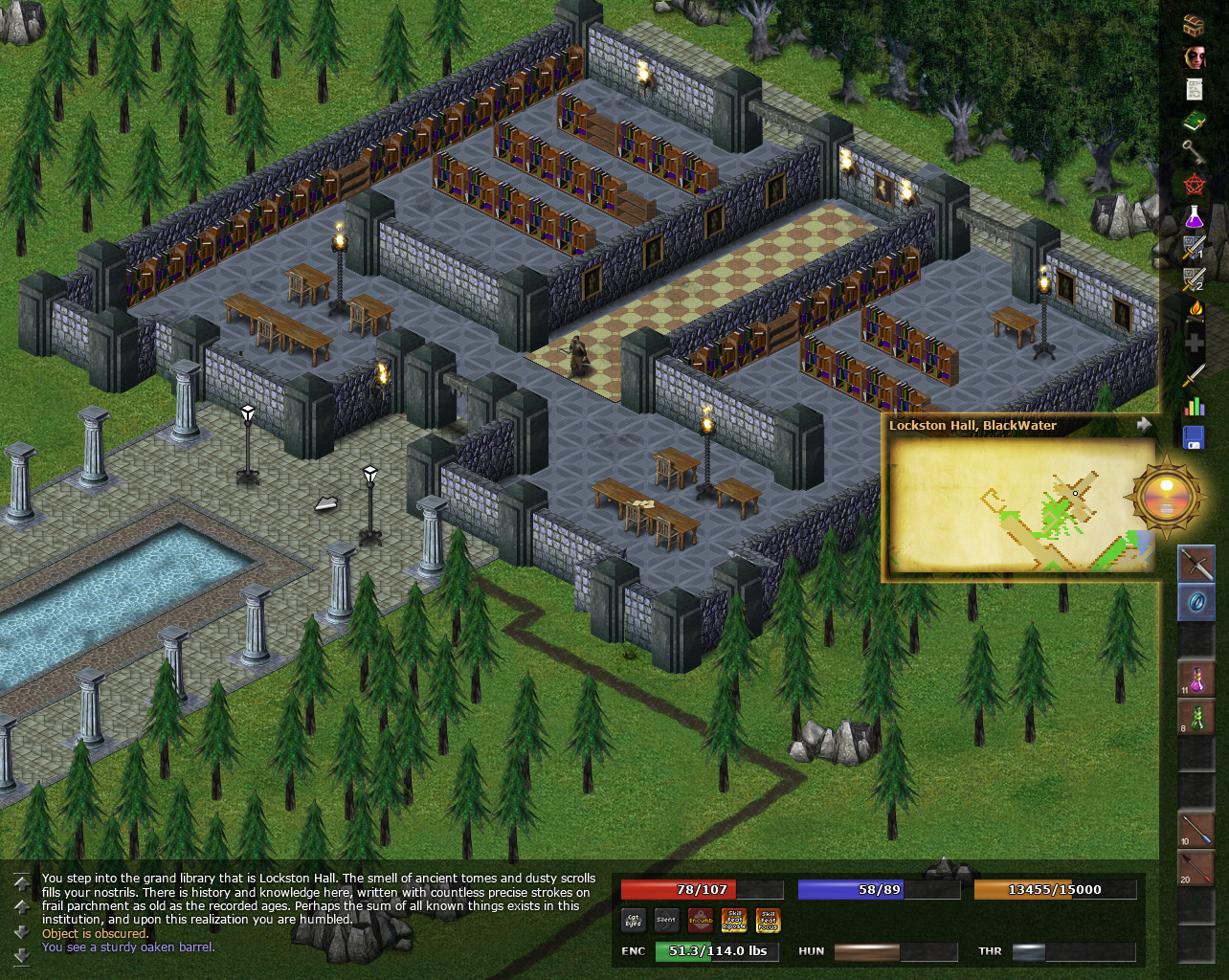
And the map opened.
http://www.kxmode.com/eschalon/Eschalon ... en-map.jpg

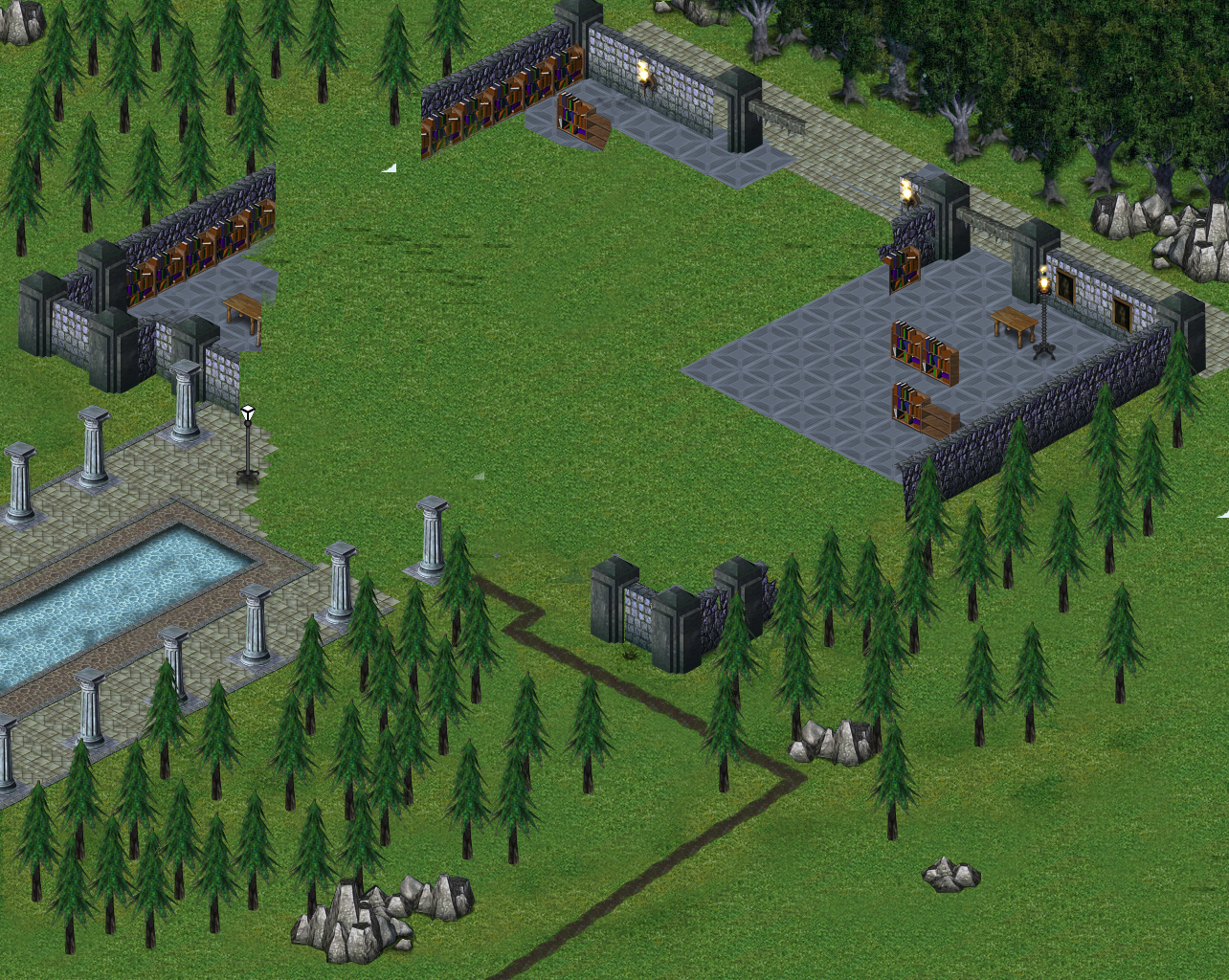
Here's the remastered screenshot with no UI elements or the original screenshot so you can see all the stuff I added.
http://www.kxmode.com/eschalon/Eschalon ... layout.jpg

And all of the nitty gritty things I digitally remastered. Notice the walkway with pool. I made that using elements from the original screenshot!
http://www.kxmode.com/eschalon/Eschalon ... prites.jpg

All in all I spent 7.5 hours making this. I had lots of fun! Hope it gives you some ideas Basilisk. :)


Top
 Offline Profile  
 
 Post subject: Re: Eschalon Book 3 conceptual UI (with images!)
PostPosted: Thu Apr 29, 2010 7:34 am 
Captain
Captain
User avatar

Joined: Thu Jan 10, 2008 2:09 pm
Posts: 1088
Very, very nice Kxmode. :)

_________________
Unofficial Eschalon: Book I FAQ | Unofficial Eschalon: Book II FAQ
Formerly known as Jedi_Learner


Top
 Offline Profile  
 
 Post subject: Re: Eschalon Book 3 conceptual UI (with images!)
PostPosted: Thu Apr 29, 2010 7:48 am 
Senior Steward
User avatar

Joined: Sat Sep 27, 2008 9:49 am
Posts: 82
Location: Italy, Tuscany
A cool example of what Book III would be. :wink:

_________________
Old School RPG lover and  Apple User since 2007!


Top
 Offline Profile  
 
 Post subject: Re: Eschalon Book 3 conceptual UI (with images!)
PostPosted: Thu Apr 29, 2010 6:06 pm 
Marshall
User avatar

Joined: Thu Mar 18, 2010 5:42 pm
Posts: 130
Location: Federal Way, WA
Wait...you mean Eschalon III won't be re-envisioned to be a first person shooter?

:p


Top
 Offline Profile  
 
 Post subject: Re: Eschalon Book 3 conceptual UI (with images!)
PostPosted: Thu Apr 29, 2010 7:24 pm 
Major General
Major General
User avatar

Joined: Sat Apr 26, 2008 4:44 pm
Posts: 2037
Arkos wrote:
Wait...you mean Eschalon III won't be re-envisioned to be a first person shooter?

:p

Not unless EA makes BW an offer he can't refuse.

_________________
---

Kill 'em all, let the sysadmin sort 'em out.


Top
 Online Profile  
 
 Post subject: Re: Eschalon Book 3 conceptual UI (with images!)
PostPosted: Sat May 08, 2010 2:20 am 
Marshall
User avatar

Joined: Fri Aug 28, 2009 5:30 am
Posts: 129
man that is awesome now i could only wish that EB3 be even remotly close to that

_________________
Life is not many Experiences , it's only one experience lived by each person from a different perspective

P.s : excuse my bad English

StiLL Waiting FoR EB3


Top
 Offline Profile  
 
 Post subject: Re: Eschalon Book 3 conceptual UI (with images!)
PostPosted: Wed May 12, 2010 2:54 pm 
Marshall
User avatar

Joined: Mon Apr 28, 2008 4:53 pm
Posts: 146
Location: Malvern, UK
SuPeR RaPPeR wrote:
man that is awesome now i could only wish that EB3 be even remotly close to that

If BW is willing to pay Kxmode, it might be.

_________________
Stuart "Sslaxx" Moore.


Top
 Offline Profile  
 
 Post subject: Re: Eschalon Book 3 conceptual UI (with images!)
PostPosted: Sat May 22, 2010 7:47 am 
Apprentice

Joined: Wed Dec 26, 2007 6:51 pm
Posts: 34
I don't like the bottom part of the UI at all. Too much black, too many clean straight lines and stuff. And the bit popping off doesn't look good, closed or open, it should probably be in a corner instead. Maybe you could add an action bar with spell and skill shortcuts somewhere instead of that black space. But it's nice to see Eschalon in high res. I'd love to get an update for Book II that allows this even, if possible. For balance purposes it could have fog-of-war type (the see-through kind that leaves environments mostly visible but not enemies and other details) effects. The game's display is already low res as it is, and having the huge UI on top makes the viewed area too small. Oh well, it's still charming.


Top
 Offline Profile  
 
 Post subject: Re: Eschalon Book 3 conceptual UI (with images!)
PostPosted: Mon May 31, 2010 1:27 am 
Captain
Captain
User avatar

Joined: Mon Jul 07, 2008 12:28 pm
Posts: 1031
Location: Ed Markey Land
Hmm... looks quite good. Nice work Kx. :)

I'm always a fan, of course, for the most efficient use of screen space.

_________________
lieli[s]t
t/GLm_g
Blek`stad/en


Top
 Offline Profile  
 
 Post subject: Re: Eschalon Book 3 conceptual UI (with images!)
PostPosted: Thu Jun 03, 2010 10:58 am 
Initiate

Joined: Tue Jun 10, 2008 4:56 pm
Posts: 8
Thanks everyone! :)

Eschalon is such a wonderful looking game. I thought it would be great to minimize the user interface as much as possible in order to show more of the game world, especially if Book 3 increases to 1280 x 1024.

@Al3xand3r

I agree. Actually at one point I didn't have the black bar. I decided it was necessary for contrast reasons. One of the main goals of any UI is to give users quick access to important information. Having a strong contrast is a simple way to achieve this.

I'm tossing around the idea of going back and making the UI even more minimal, but I don't want to copy WOW's interface. That's too easy and not very challenging from a design perspective. I think Eschalon's UI should have a signature aesthetic all its own.


Top
 Offline Profile  
 
 Post subject: Re: Eschalon Book 3 conceptual UI (with images!)
PostPosted: Thu Sep 02, 2010 6:58 pm 
Pledge
User avatar

Joined: Thu Sep 02, 2010 6:26 pm
Posts: 2
Good idea, but i think add button to hide all ui, except clock (or with they) :)

_________________
For The Enroth Glory!
tuning 4x4http://www.centplay.com/affiliate/id_366/


Top
 Offline Profile  
 
 Post subject: Re: Eschalon Book 3 conceptual UI (with images!)
PostPosted: Fri Mar 18, 2011 11:58 pm 
Initiate

Joined: Tue Jun 10, 2008 4:56 pm
Posts: 8
Updated UI concept :)

http://www.kxmode.com/eschalon/Eschalon ... cept-2.jpg


Top
 Offline Profile  
 
 Post subject: Re: Eschalon Book 3 conceptual UI (with images!)
PostPosted: Sun Mar 20, 2011 7:55 pm 
Officer [Gold Rank]
Officer [Gold Rank]
User avatar

Joined: Thu Apr 15, 2010 6:40 am
Posts: 417
I like the new updated concept. I like especially the semi-transparent border around the UI elements; as much as I liked the "stone" look of the official UI semi-transparency gives more room to the actual gameplay area and I'm a stickler for minimalist UIs and maximum gameplay area. The only thing I don't like is where the minimap is located, it's too obtrusive where you have it. I think it would be better in the upper corner.

_________________
Will Pay For Cloth Map


Top
 Online Profile  
 
 Post subject: Re: Eschalon Book 3 conceptual UI (with images!)
PostPosted: Mon Mar 21, 2011 10:43 am 
Captain Magnate
Captain Magnate
User avatar

Joined: Sun Aug 31, 2008 12:07 pm
Posts: 1339
Location: Southern California
Kxmode wrote:

While I like what you've done here (though I agree with sirdilznik on the location of the Minimap) esp. in regards to making the actual playable screen area much larger, it should be noted that BW has said that there will be no changes to the UI in Book III.

So, at this point, this is probably more of an 'academic' exercise that may still, nonetheless, influence BW on the design of UIs for future games... ;)


Top
 Offline Profile  
 
 Post subject: Re: Eschalon Book 3 conceptual UI (with images!)
PostPosted: Mon Mar 21, 2011 11:10 am 
Initiate

Joined: Tue Jun 10, 2008 4:56 pm
Posts: 8
sirdilznik wrote:
I like the new updated concept. I like especially the semi-transparent border around the UI elements; as much as I liked the "stone" look of the official UI semi-transparency gives more room to the actual gameplay area and I'm a stickler for minimalist UIs and maximum gameplay area. The only thing I don't like is where the minimap is located, it's too obtrusive where you have it. I think it would be better in the upper corner.


Me too. The less the UI the better. Of course there's a trade-off between having no UI and showing critical information. There's also the issue of properly contrasting key elements of a UI namely all the icons and dialog text. The reason for the minimap's location is so that it is approximately level with the player's eye. That was one of the things I hated about minimaps in MMOs. They place it all the way up in the upper-right corner. I always felt it should be placed in the center-right of the screen so that it's on the same horizon line as the player's avatar. Less head moment equals less strain... you know, for us "older" gamers. ;)

IJBall wrote:
So, at this point, this is probably more of an 'academic' exercise that may still, nonetheless, influence BW on the design of UIs for future games... ;)


That's pretty much all it is. I found it a fun exercise in UI game design. :)


Top
 Offline Profile  
 
Display posts from previous:  Sort by  
Post new topic Reply to topic  [ 17 posts ]  Go to page 1, 2  Next

All times are UTC - 5 hours [ DST ]


Who is online

Users browsing this forum: Bing [Bot], sirdilznik and 1 guest


You cannot post new topics in this forum
You cannot reply to topics in this forum
You cannot edit your posts in this forum
You cannot delete your posts in this forum
You cannot post attachments in this forum

Search for:
Jump to: